Where to Put Analytics Tracking Code in HTML: Head or Body
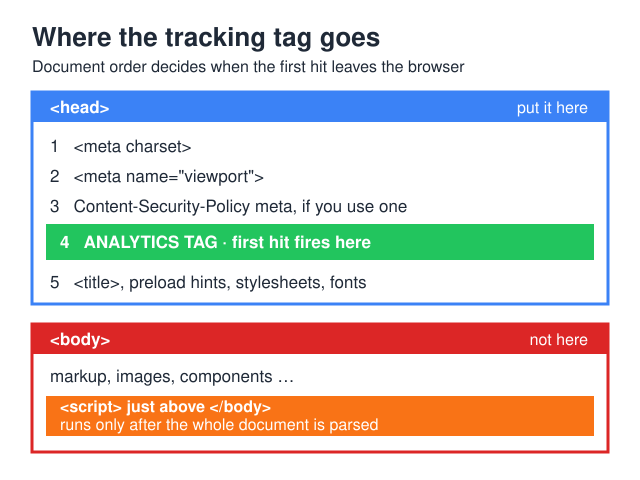
Short answer: the tag goes in <head>, as high as you can get it — after <meta charset> and the viewport tag, before your stylesheets. The vendors agree, each with its own wrinkle. Google’s gtag.js install instructions put the snippet immediately after the opening <head> tag. Matomo’s install FAQ says the <head> section, before the closing </head> tag. PostHog says to add the snippet within the <head> tag. Umami says insert it into the <head> section. Plausible says place the snippet within the <head> … </head> tags. GoatCounter is the outlier and says anywhere on the page. Never paste a second copy into <body>.
Position matters for a reason that has nothing to do with page speed. A pageview is tied to the moment the script executes, not to the moment the page finishes loading. A tag sitting just above </body> doesn’t run until the parser has walked the entire document — so a visitor who hits back before the parser gets that far is never counted at all.
The mechanics are identical for gtag.js, self-hosted Plausible, Matomo, Umami, PostHog and GoatCounter — all of them are script elements competing with the HTML parser. The install recipes hub covers the server side; this page covers the markup that decides whether the server ever hears from a browser.
Where exactly does the tag go in the HTML?
Here is the order, with the reason for each position rather than a shrug.
<head>
  <meta charset="utf-8">
  <meta name="viewport" content="width=device-width, initial-scale=1">

  <!-- CSP via meta, if you use one: it only governs what comes after it -->
  <meta http-equiv="Content-Security-Policy" content="script-src 'self' 'nonce-r4nd0m'">

  <!-- analytics: first thing after the meta block -->
  <script async src="https://analytics.example.com/script.js"
          data-website-id="…" nonce="r4nd0m"></script>

  <title>…</title>
  <link rel="preload" as="font" href="/fonts/inter.woff2" crossorigin>
  <link rel="stylesheet" href="/assets/app.css">
</head>
The charset declaration stays first because, per MDN’s reference for the <meta> element, “<meta> elements which declare a character encoding must be located entirely within the first 1024 bytes of the document.” Push it down with a fat inline analytics block and you can genuinely break the encoding sniff.
The CSP meta tag sits above the analytics tag deliberately. A policy delivered through <meta http-equiv> only governs what the parser sees after it, so putting your tags above the policy means they quietly escape it — convenient right up to the security review. Keep the policy first and give the tag a matching nonce.
Analytics then goes above the stylesheet and font preloads. Stylesheets are render-blocking; an async script declared above them is discovered by the preload scanner in the same first chunk of markup and downloads while CSS is still in flight. Below them, it queues behind render-critical work.
Why <head> and not right before </body>?
“Scripts belong at the bottom” is a performance habit that predates async. It was good advice when every script blocked the parser. For an analytics counter it now costs data without buying much speed.
The parser only reaches the tag once
MDN’s <script> reference is blunt: “Scripts without async, defer or type="module" attributes, as well as inline scripts without the type="module" attribute, are fetched and executed immediately before the browser continues to parse the page.” At the bottom of <body>, “immediately” means after every image tag, component and third-party embed above it has been parsed. On a long page over a slow connection that is not milliseconds — it is the difference between counting a visit and not.
What “the first hit” actually is
Every counter here fires its pageview at initialisation, not at load. Google’s GA4 page-views guide states: “Whenever someone loads a page of your website or their browser history state is changed by the active site, an enhanced measurement event called page_view is sent from your website to Google Analytics.” Matomo’s snippet pushes ['trackPageView'] onto the _paq queue before the tracker file has even downloaded. Umami and Plausible auto-track the first view the moment their script initialises.
So the question “where should the analytics tracking code be placed” reduces to a simpler one: how early do you want that initialisation? Head placement puts it before the bulk of the document exists; footer placement puts it after. The visitors lost in between are the ones you most want to know about — fast bounces, mis-clicks, people in a tunnel. Their absence never shows up as an error. It shows up as a bounce rate that looks suspiciously healthy.
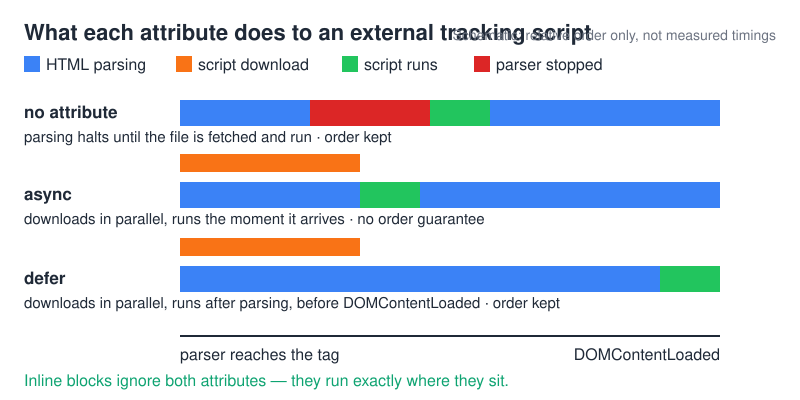
async, defer, or neither — what each does to a tracking script?
Both attributes apply only to external scripts. An inline block ignores them and runs exactly where it sits — which is why the gtag configuration block and the Matomo _paq block stay synchronous no matter what you do to the tag above them.
| Attribute | When it runs | Blocks parsing? | Order preserved? | Right for |
|---|---|---|---|---|
| none | Fetched and executed immediately, before parsing continues | Yes — parser stops for fetch and execution | Yes, document order | Nothing external. Fine for the small inline config block. |
async |
Fetched in parallel with parsing, “evaluated as soon as it is available” (MDN) | Not for the fetch. Execution still blocks rendering at that instant. | No — MDN: “You can’t rely on the order the scripts will load in.” | Standalone counters and tag-manager containers: one independent tag with no dependencies. |
defer |
“After the document has been parsed, but before firing DOMContentLoaded“ |
No | Yes — deferred scripts run in document order | Trackers that must run after a consent stub or a config script has defined globals. |
type="module" |
Deferred by default, even without the attribute | No | Yes | Bundled first-party wrappers around a tracker SDK. |
For a counter, async is the right default: no dependencies, evaluated at the earliest possible moment rather than parked until parsing completes. defer wins when something else must exist first — a consent stub that defines the global your tracker checks. The combination to avoid is defer plus footer placement, which stacks two delays for no benefit.
Where each tracker’s snippet belongs
What the six popular options actually ship, and the thing that bites you when you self-host them.
| Tracker | Documented placement | Attribute in the shipped snippet | Self-host gotcha |
|---|---|---|---|
| GA4 / gtag.js | “Immediately after the opening <head> HTML tag on every page you want to measure” |
async on the external tag; the gtag('config', …) block below it is inline and synchronous |
Not self-hostable in any supported way. Two copies of the snippet means config runs twice and the automatic page_view fires twice. |
| Plausible CE | “Place the snippet within the <head> … </head> tags” |
async on the tracker file, plus an inline stub that calls plausible.init() |
The current snippet is not the old data-domain one. Proxied and self-hosted setups override the destination with the documented endpoint option inside plausible.init(); miss it and events go to the default host. |
| Matomo | The install FAQ says the <head> section, before </head>. The developer guide says “just after the opening <body> tag (or within the <head> section)”. |
An inline block that builds _paq, then creates its own script element with g.async=true |
The snippet hard-codes your instance URL in u and the site number in setSiteId. Wrong u = silent zero, no console error. |
| Umami | “Copy the code and insert it into the <head> section of your website” |
defer, with data-website-id on the same tag |
If the script is served from one host and data must land on another, set data-host-url — otherwise Umami sends data to wherever the script came from. |
| PostHog | “Add this snippet to your website within the <head> tag” |
An inline loader that injects its own script element with async set in code |
The loader derives the asset URL from the api_host you pass to init. Point api_host at your reverse proxy and the library follows it. |
| GoatCounter | “just add the following JavaScript anywhere on the page” | async, with the endpoint in data-goatcounter |
The endpoint lives in the attribute, not the src. Self-hosting means changing data-goatcounter to your own /count path — changing only src keeps sending data to the hosted service. |
Matomo contradicts itself across its own docs, and both answers work — but only the head version survives a fast bounce. GoatCounter’s “anywhere” is honest rather than sloppy: a tiny counter with no dependencies costs almost nothing in head and only a handful of short visits in body. Pick head anyway. Working setups for two of these live at Plausible CE on Hetzner and Umami on Vercel.
What breaks when the code sits in the wrong place?
Five symptoms, each with the cause and the check that separates it from the others.
1. Sessions look thin and bounce rate looks great
Cause: footer placement. You are dropping the shortest visits systematically, so every engagement metric improves while the total shrinks. Check: compare a day of tracker pageviews against server access logs for one popular URL. A gap skewed toward the fastest requests is the fingerprint.
2. Every number is roughly doubled
Cause: two copies of the tag — usually a theme that hard-codes the snippet plus a plugin that injects it. Check: curl the page, count occurrences of the script host, then watch the Network panel for two identical collection requests on one load.
3. The SPA only ever reports the landing page
Cause: the tag was mounted inside a route component instead of the app shell’s head, so it initialises once and never again — or re-mounts on every route and double-counts. Trackers do handle client-side navigation once loaded: Umami’s SPA guide says its “tracker script monitors the browser’s History API (pushState and replaceState) and the popstate event”, and Google’s tag sends a page_view on history changes. Hash routers are the exception — Plausible has a documented hashBasedRouting option for # paths.
4. Hits race the consent banner
Cause: an unconditional head tag next to a consent platform that loads later. It fails in both directions: the tracker fires before the visitor decides, or the platform blocks the tag and the tracker never initialises. Check: open the page with a clean profile, watch the Network panel, touch nothing. Whatever leaves the browser in those first seconds is what you are actually shipping.
5. The tag is on the page and does nothing
Cause: something is silently neutralising it. A Content Security Policy with a script-src 'nonce-…' source expression requires the same nonce on the tag — MDN’s script-src reference is explicit that “you need to include the same nonce in the <script> element”. Cloudflare’s Rocket Loader is the other classic: it “prioritizes your website’s content (text, images, fonts, and more) by deferring the loading of all of your JavaScript until after rendering”, which makes head placement irrelevant. The documented escape hatch is adding data-cfasync="false". Check: the console prints a CSP violation, and view-source against the live DOM shows what got rewritten.
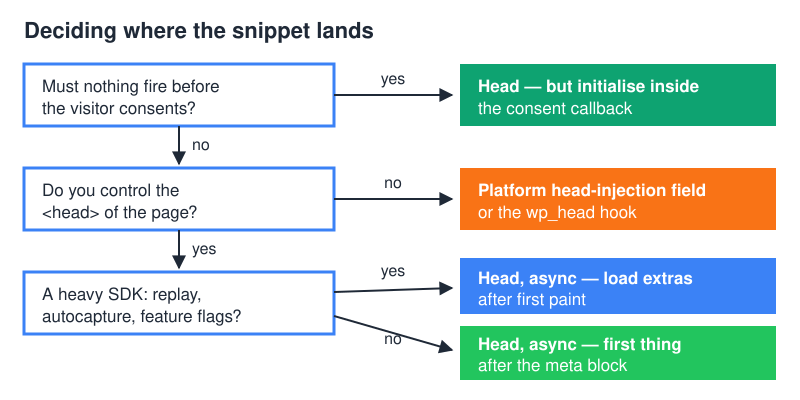
Where does it go if you don’t control the <head>?
WordPress. Hook wp_head from a must-use plugin. WordPress’ own reference for wp_head describes the hook as triggered “within the <head></head> section of the theme’s header.php template” — precisely the slot you want. Use an mu-plugin, not a theme edit (an update overwrites header.php) and not a third analytics plugin (that is how sites end up with two copies of one snippet).
Hosted platforms. Most expose a head-injection field in the theme or site settings. Use it. If the platform only offers a “custom HTML” widget that renders inside <body>, you are accepting the trade-off knowingly — and you now know which visits you are giving up.
Static site generators. The head lives in a base layout or partial. Put the tag there once, not in a per-page front-matter field, so a new template can’t ship without it.
Edge injection. If you already proxy the tracker through your own domain, a Cloudflare Worker can rewrite the HTML stream and insert the tag into <head> before it reaches the browser — useful when the CMS isn’t yours. It also means the tag disappears when the Worker route changes, so monitor it like any other route. When a container rather than a hard-coded snippet owns the head slot, see the self-hosted tag manager hub.
How to verify the placement in three checks
Three checks, in order. The first two need nothing but a terminal.
# 1. Is the tag above </head>? Compare the line numbers.
curl -s https://example.com/ \
  | grep -n -E 'gtag/js|plausible|matomo\.js|umami|posthog|count\.js|</head>'

# One-line verdict:
curl -s https://example.com/ | awk '
  /<\/head>/ && !h { h = NR }
  /gtag\/js|plausible|matomo|umami|posthog|goatcounter/ { print "tag  -> line " NR }
  END { print "</head> -> line " h }'

# 2. Duplicates: anything above 1 means two copies in the served HTML.
curl -s https://example.com/ | grep -c 'googletagmanager.com/gtag/js'
If the tag’s line number is lower than the </head> line, it is in the head as served. That qualifier matters: curl shows the document the server sent, not the DOM the browser built. A tag injected by a container or a Worker won’t appear here at all — itself a useful signal about who owns the tag.
Third check, in the browser: open DevTools → Network, filter by the tracker’s endpoint, reload. collect catches the Google tag; matomo.php catches Matomo, /api/event Plausible, /api/send Umami, count GoatCounter. Confirm the exact path against your own tracker’s docs — self-hosted and proxied installs move it. You want exactly one such request per load, early in the waterfall. Two means duplicate tags; zero means the tag is present but never ran — back to the CSP and Rocket Loader checks.
When NOT to put it in <head>
Three cases where the default is wrong, and one where it barely matters.
When nothing may fire before consent. If your compliance stance is that no analytics request leaves the browser until the visitor agrees, an unconditional head tag is the wrong shape however early it loads. The fix is not the footer — that only makes the race harder to reason about. Keep the tag in head and gate the initialisation: plausible.init(), posthog.init() and the Matomo _paq queue all give you somewhere to wait for a consent callback. A script being present is not the same as a script having sent anything.
When the SDK is heavy and the audience is not. A pageview counter is small; a product-analytics bundle with session replay, autocapture and feature flags is not, and MDN is clear that once an async script finishes downloading it “will execute, which blocks the page from rendering”. On low-end mobile that execution lands in the middle of first paint. Split it: counter in head, heavy modules behind an idle callback or a user interaction.
When head placement is papering over something else. If your self-hosted endpoint 404s or the container serving the script is cold, moving the tag earlier only makes the failure earlier. Serve the tracker file from a static path and reserve the function for the event endpoint, which nobody’s first paint is waiting on.
The honest caveat: on a fast static site with engaged traffic, the head-versus-footer gap is small in absolute numbers, because the visits you recover are the shortest ones. Worth having — undercounted bounces distort every downstream ratio — but it is hygiene, not a growth lever.
FAQ
Head or body — what should I pick if I’m not sure?
Head. Every failure mode of head placement is loud (a blocked request, a console error, a duplicate hit) and every failure mode of body placement is silent. Loud is cheaper to debug.
Does placement still matter if I use a tag manager?
More, not less — the container inherits its position and hands that timing to every tag inside it. Put the container in head with the attribute its vendor documents. Order inside the container is a separate mechanism (sequencing and triggers), and consent gating belongs there rather than in your HTML.
Can I run two counters in the same <head>?
Yes. Independent trackers don’t collide: each has its own global, queue and endpoint. Give both async, and accept two script downloads and two hits per pageview. The usual reason is a migration where you want overlapping data before cutting one loose.
Doesn’t moving scripts to the footer make the site faster?
It did before async and defer existed. A counter with async in head does not block parsing, and the file is small. If you suspect it hurts, measure LCP with and without the tag instead of relocating on principle — the render-blocking cost usually sits in fonts and CSS.
How does this work in a SPA — Next.js, Nuxt, SvelteKit?
Put the tag in the framework’s document or root layout head, never in a route component. Route components mount and unmount, giving you either one initialisation for the whole session or one per navigation — both wrong. Loaded correctly, the tracker handles client-side navigation itself by watching the History API. Hash routes are the exception and usually need an explicit option.
The rule, compressed
Head, high, async, once. Gate the initialisation rather than the placement when consent is involved, split heavy SDKs, and verify with the two terminal checks above before believing any dashboard. Everything above is the explanation for why those four words are the whole answer — and why the tag in your footer has been quietly rounding your traffic down since the day you installed it.
Found this useful?
Try the Stack Picker to get a personal recommendation, or browse the install recipe library.