GoatCounter on a Cheap VPS: Minimal Self-Hosted Analytics
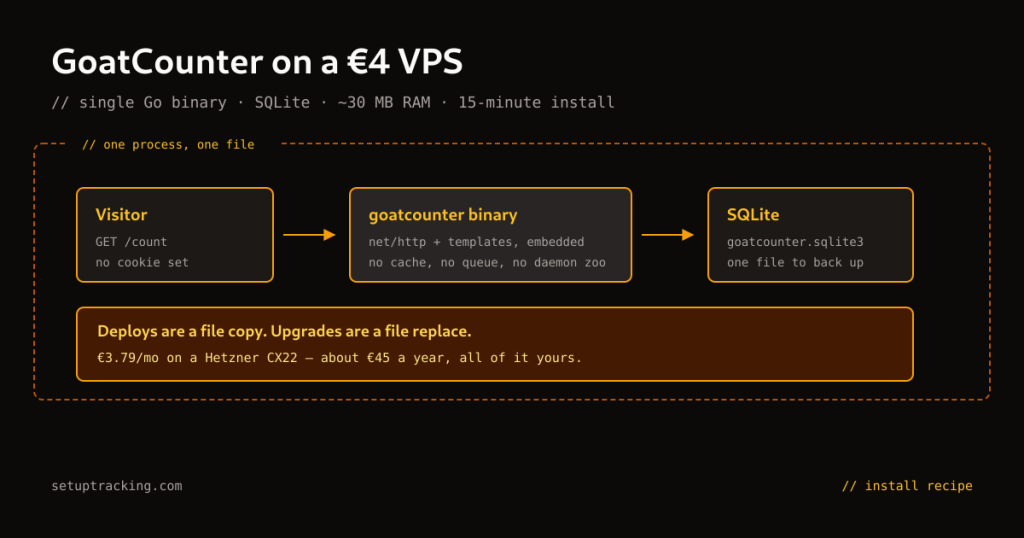
GoatCounter is a single static binary. No Docker, no Postgres cluster, no Redis, no Node process manager. You copy one file, write one systemd unit, and add an nginx proxy block. The full install runs in 15 minutes on a €5.49/month Hetzner CX23 (2 vCPU / 4 GB RAM / 40 GB SSD). Total annual cost: €65.88. It tracks pageviews, referrers, browsers, screen sizes, countries, and custom events — everything a content site or personal project needs from analytics. What it deliberately doesn’t do is tell you the story of individual user sessions, because that’s not the product GoatCounter is. Understanding that boundary before you deploy will save you from configuring something that can’t do what you want.
This guide is the full setup: server provisioning, binary install, nginx proxy, TLS, systemd service, backup, and an honest section on where GoatCounter breaks down so you can make an informed choice before you install it.
What GoatCounter does under the hood
GoatCounter’s architecture is deliberately minimal. The binary embeds an HTTP server (net/http from Go’s standard library), a template engine, and a SQLite database. There’s no external database process, no cache layer, no message queue. Pageviews come in as HTTP requests to /count, the binary writes them to SQLite, and the dashboard reads from the same SQLite file. The single binary approach means deploys are a file copy, upgrades are a file replace, and backups are a file copy of goatcounter.sqlite3.
The tracking model is count-based, not session-based. GoatCounter tracks each pageview as a discrete event. It does not reconstruct user sessions, does not track return visitors across pages in a sequence, and does not record time-on-page. What it does record: the URL path, referrer, browser and OS fingerprint, screen size bucket, country (from IP geolocation), and a hit timestamp. Custom events follow the same model — they’re counted, not sequenced.
Privacy model
GoatCounter does not use cookies. It does not store IP addresses beyond the geolocation lookup. The “visitor” count is an approximation based on browser fingerprint — User-Agent + IP hash + day — with the IP immediately discarded. This design makes GoatCounter GDPR-compliant without a consent banner in most EU jurisdictions. Verify with your own legal counsel before assuming, especially in Germany (TTDSG) and France (CNIL). The GoatCounter official GDPR documentation has the full breakdown.
Server in five minutes
GoatCounter runs comfortably on a small VPS. The current entry-level option in Hetzner’s catalog is the CX23 (2 vCPU / 4 GB RAM / 40 GB SSD, €5.49/mo, Helsinki or Falkenstein). This is sufficient for a personal site or project running up to roughly 1–2M monthly pageviews (estimate, not a benchmark — watch SQLite latency as traffic grows). If you’re running multiple sites on the same instance or need more headroom, step up to the CX33 or CX43.
If the CX23 is greyed out — the cheap line is stock-limited and was unavailable on 13 August 2026 — GoatCounter is light enough that the smallest current box, a CPX12 at €11.49/mo ex VAT, still leaves plenty of headroom.
Hetzner Cloud Console → Add Server → Helsinki → Ubuntu 24.04 → CX23 → add your SSH public key → name it goatcounter-1. Note the IPv4 address. Cost: €5.49/mo.
DNS
Type: A
Name: stats          (e.g. stats.yoursite.com)
Value: YOUR_SERVER_IP
TTL:   300
Wait for propagation: dig +short stats.yoursite.com. When it returns your IP, move on.
ssh root@YOUR_SERVER_IP

apt update && apt upgrade -y
apt install -y curl ca-certificates nginx ufw

# Firewall
ufw default deny incoming
ufw default allow outgoing
ufw allow 22/tcp
ufw allow 80/tcp
ufw allow 443/tcp
ufw --force enable

# Create a non-root user for the GoatCounter process
useradd --system --shell /bin/false --home /var/lib/goatcounter --create-home goatcounter
Install the binary and seed the database
GoatCounter releases pre-built binaries for Linux amd64 on GitHub. The current release is v2.7.0 (December 2025). Download the binary directly:
cd /tmp

# Download GoatCounter v2.7.0 for Linux amd64
curl -L https://github.com/arp242/goatcounter/releases/download/v2.7.0/goatcounter-v2.7.0-linux-amd64.gz \
  -o goatcounter.gz

# Decompress and install
gunzip goatcounter.gz
chmod +x goatcounter
mv goatcounter /usr/local/bin/goatcounter

# Verify
goatcounter version
# Output: goatcounter version 2.7.0; go1.22.x linux/amd64
Check the GoatCounter releases page for the latest version before running this. The filename pattern is always goatcounter-vX.Y.Z-linux-amd64.gz.
GoatCounter uses a db flag to specify the SQLite file path and the saas vs serve command to determine the deployment mode. For self-hosting a single site, use serve:
# Create the data directory
mkdir -p /var/lib/goatcounter/data
chown -R goatcounter:goatcounter /var/lib/goatcounter

# Initialize the database and create the first site
# Replace the values with your actual domain and email
sudo -u goatcounter goatcounter db -db "sqlite+/var/lib/goatcounter/data/goatcounter.sqlite3" \
  create site \
  -vhost stats.yoursite.com \
  -user.email [email protected] \
  -user.password 'REPLACE_WITH_STRONG_PASSWORD'
This creates the SQLite database, runs the schema migrations, and creates the admin user. The output will confirm the site URL and user ID. Note the password — there’s no recovery mechanism other than direct database manipulation.
Adding additional sites
GoatCounter supports multiple sites in one instance using the -vhost flag at serve time. Each additional site gets its own subdomain under the parent domain. For a second site:
sudo -u goatcounter goatcounter db -db "sqlite+/var/lib/goatcounter/data/goatcounter.sqlite3" \
  create site \
  -vhost stats2.yoursite.com \
  -user.email [email protected] \
  -user.password 'SAME_OR_DIFFERENT_PASSWORD'
Run it as a service
cat > /etc/systemd/system/goatcounter.service << 'EOF'
[Unit]
Description=GoatCounter analytics
After=network.target

[Service]
User=goatcounter
Group=goatcounter
Type=simple
ExecStart=/usr/local/bin/goatcounter serve \
  -db sqlite+/var/lib/goatcounter/data/goatcounter.sqlite3 \
  -listen 127.0.0.1:8085 \
  -static stats.yoursite.com
Restart=always
RestartSec=5
StandardOutput=journal
StandardError=journal
SyslogIdentifier=goatcounter

# Hardening
NoNewPrivileges=yes
PrivateTmp=yes
ProtectSystem=strict
ReadWritePaths=/var/lib/goatcounter

[Install]
WantedBy=multi-user.target
EOF

systemctl daemon-reload
systemctl enable goatcounter
systemctl start goatcounter
systemctl status goatcounter
The critical flag here is -static stats.yoursite.com. This is the domain that GoatCounter uses to serve its static assets (the tracking script, the dashboard CSS and JS). In GoatCounter v2.7.0, the flag is -static <domain> — not -static-domain, which was the old name. Using the wrong flag causes the dashboard to load without styles and the tracking script to 404.
GoatCounter listens on 127.0.0.1:8085 as configured in this service file (the -listen flag). It will not listen on 443 directly — TLS termination is handled by nginx. The explicit localhost binding prevents the port from being accessible without the proxy.
cat > /etc/nginx/sites-available/goatcounter << 'NGINXEOF'
server {
    listen 80;
    server_name stats.yoursite.com;
    return 301 https://$host$request_uri;
}

server {
    listen 443 ssl;
    server_name stats.yoursite.com;

    ssl_certificate     /etc/letsencrypt/live/stats.yoursite.com/fullchain.pem;
    ssl_certificate_key /etc/letsencrypt/live/stats.yoursite.com/privkey.pem;
    ssl_protocols       TLSv1.2 TLSv1.3;
    ssl_ciphers         ECDHE-ECDSA-AES128-GCM-SHA256:ECDHE-RSA-AES128-GCM-SHA256:ECDHE-ECDSA-AES256-GCM-SHA384:ECDHE-RSA-AES256-GCM-SHA384;
    ssl_prefer_server_ciphers off;

    add_header X-Frame-Options DENY;
    add_header X-Content-Type-Options nosniff;

    location / {
        proxy_pass         http://127.0.0.1:8085;
        proxy_set_header   Host $host;
        proxy_set_header   X-Real-IP $remote_addr;
        proxy_set_header   X-Forwarded-For $proxy_add_x_forwarded_for;
        proxy_set_header   X-Forwarded-Proto $scheme;
    }
}
NGINXEOF

ln -s /etc/nginx/sites-available/goatcounter /etc/nginx/sites-enabled/goatcounter
TLS with certbot
apt install -y certbot python3-certbot-nginx

# Stop nginx temporarily for standalone challenge
systemctl stop nginx
certbot certonly --standalone -d stats.yoursite.com --non-interactive --agree-tos -m [email protected]
systemctl start nginx

# Verify the cert
nginx -t && systemctl reload nginx
Certbot installs a systemd timer for auto-renewal. Confirm it's active: systemctl status certbot.timer. If it's inactive or failed, enable it manually: systemctl enable --now certbot.timer. A lapsed cert causes a Cloudflare 526 error if you're fronting with CF — check renewal status monthly.
Add the tracking script to your site
Log into your GoatCounter dashboard at https://stats.yoursite.com with the email and password you set during database initialization. Go to Settings → Sites & Users to find your site code (it's in the script snippet). Add to every page you want to track, just before </body>:
<script data-goatcounter="https://stats.yoursite.com/count"
        async src="//stats.yoursite.com/count.js"></script>
The script is ~9.0 KB uncompressed (~3.2 KB gzip-transferred). It makes a single request to /count with the page URL, referrer, and browser metadata. No cookies are set. The async attribute ensures it doesn't block page render. For a WordPress site, add this to your theme's footer.php or use a header/footer plugin.
Tracking custom events
GoatCounter's custom event API is intentionally minimal. Call window.goatcounter.count() with a path and title:
// Track a button click as a custom event
document.getElementById('download-btn').addEventListener('click', function() {
  window.goatcounter.count({
    path: 'download-clicked',
    title: 'Download button clicked',
    event: true
  });
});
Events appear in your dashboard under the custom path you gave them. They're counted separately from pageviews. You can filter the dashboard by path prefix to see events vs pageviews. This is the extent of GoatCounter's event model — there are no event categories, no properties, no funnels. If you need those, GoatCounter is the wrong tool (see Where GoatCounter runs out of road).
Keeping it running
GoatCounter's entire state is in one SQLite file: /var/lib/goatcounter/data/goatcounter.sqlite3. Back it up with a simple copy. The safe way to copy an active SQLite database is using SQLite's backup command rather than cp, which can catch the file in the middle of a write:
# Safe backup of active SQLite database
sqlite3 /var/lib/goatcounter/data/goatcounter.sqlite3 \
  ".backup /var/lib/goatcounter/data/goatcounter-$(date +%Y%m%d).sqlite3"

# Compress and move to backup location
gzip /var/lib/goatcounter/data/goatcounter-$(date +%Y%m%d).sqlite3
mv /var/lib/goatcounter/data/goatcounter-$(date +%Y%m%d).sqlite3.gz /backups/Add this to a cron job or systemd timer. Daily is sufficient for analytics data. Keep 14 days of backups locally and sync to an off-server location (Hetzner Storage Box BX11 — 1 TB at €3.20/mo — gives you a simple rsync target).
Upgrades are a three-command operation:
systemctl stop goatcounter

# Download new binary, same process as install
curl -L https://github.com/arp242/goatcounter/releases/download/vNEW_VERSION/goatcounter-vNEW_VERSION-linux-amd64.gz \
  -o /tmp/goatcounter.gz
gunzip /tmp/goatcounter.gz
chmod +x /tmp/goatcounter
mv /tmp/goatcounter /usr/local/bin/goatcounter

# Run migrations (GoatCounter does this automatically at startup too, but explicit is better)
sudo -u goatcounter goatcounter db -db "sqlite+/var/lib/goatcounter/data/goatcounter.sqlite3" migrate all

systemctl start goatcounter
systemctl status goatcounter
GoatCounter's SQLite schema migrations are additive — they don't drop columns. Downgrades are supported by restoring the binary and the pre-migration database backup.
GoatCounter and the install recipes cluster
GoatCounter occupies the minimal end of the self-hosted analytics spectrum. For a side project or personal blog where pageviews, referrers, and country data are sufficient, it's the fastest and cheapest option in the Install Recipes collection. If you need funnels, revenue tracking, and custom event properties, Plausible CE on Hetzner adds those features at a modest cost increase (CX33 for ClickHouse overhead). For full product analytics with session recordings and feature flags, the PostHog on Hetzner recipe starts at €15.99/mo. The self-hosted analytics cost comparison across all stacks is in the 3-year TCO calculator.
Where GoatCounter runs out of road
GoatCounter is the wrong choice when you need any of the following:
- User session reconstruction. GoatCounter counts hits. It doesn't know that hit 3 and hit 7 from the same visitor were part of the same browse session. If you need to know "user landed on A, then went to B, then converted on C", you need Plausible CE (funnel via ClickHouse SQL) or Matomo (native funnels). GoatCounter's visit count is an approximation, not a session model.
- Custom event properties. GoatCounter events have a path and a title. That's it. There's no way to attach metadata like
plan: "pro"orbutton_position: "hero". Plausible CE custom properties or Matomo custom dimensions are the alternatives. - Revenue tracking. GoatCounter has no revenue or ecommerce model. If you need to tie pageviews or events to order values, use Plausible CE or Matomo. The Custom Events & Goals hub covers both tools.
- High-traffic sites pushing past ~1–2M pageviews/month on a CX23. SQLite starts showing query latency beyond this range (estimate — depends on query patterns and concurrent users). You'll need to either upgrade the server (CX33 or above) or migrate to a tool with a dedicated database backend. GoatCounter's export format is CSV, which makes migration straightforward.
- Real-time dashboards for team use. GoatCounter's dashboard updates on a 60-second cycle. It's built for solo operators. If your analytics setup needs to support a marketing team refreshing dashboards every 5 seconds, a cloud tool or a Plausible CE instance with more resources is the better fit.
Verification checklist
- Service is running:
systemctl status goatcounter→ active (running). - Port is listening:
ss -tlnp | grep 8085→ shows127.0.0.1:8085. - nginx proxying correctly:
curl -I https://stats.yoursite.com→ HTTP 200 with GoatCounter headers. - Tracking script loads: open your tracked page, check the browser network tab for a request to
stats.yoursite.com/count→ HTTP 200 or 202. - Pageview appears in dashboard: visit a tracked page, check the GoatCounter dashboard within 60 seconds.
- TLS auto-renewal:
systemctl status certbot.timer→ active.certbot renew --dry-run→ success. - Backup works: run the backup command from the maintenance section manually and confirm the output file exists and is non-zero bytes.
Next step
With GoatCounter running, you have a privacy-respecting pageview counter with zero ongoing maintenance overhead. If you find you need more — funnel analysis, custom event properties, revenue tracking — the upgrade path is documented in the Install Recipes hub. The stack picker also gives you a quick comparison based on your specific requirements: data ownership, GDPR constraints, traffic volume, and feature needs.
Server and vendor prices re-checked against the Hetzner price API on 13 August 2026.
Found this useful?
Try the Stack Picker to get a personal recommendation, or browse the install recipe library.